| key features
- clear visual
interface / quick access to all synthesis parameters |
 |
|
|
| key features
- clear visual
interface / quick access to all synthesis parameters |
|
synthesisNanoloop is not sample based, but gives full access to the built-in features of the Game Boy's sound chips (like the various noise-"colors") and nanoloop's own software-synthesizer. The softsynth makes intense use of the writable hardware-wavetable and the possibilty of quick frequency changes, so no complete wave samples but mostly control signals need to be processed. Through this hardware orientated hybrid-method, real time editing and complex synthesis becomes possible. All manipulations are performed real-time, there is no "rendering time". Compared to GB sample playback, sound quality is even better because there is no digital distortion by low sampling frequency and bit depth.
sequencer
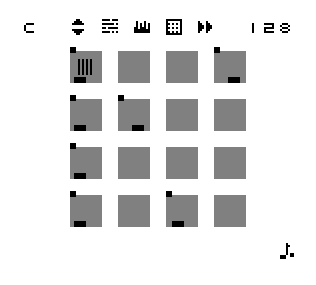
Nanoloop is a step-sequencer. This means that a loop of 16 steps is repeated continiously while each step's parameters can be edited separately. A matrix of 4 * 4 squares represents the steps and within every square one or two points or little rectangles can be moved around to adjust the step's parameters. For quick editing, there is a cut & paste function for single events and complete loop structures can be shifted left / right and inverted at once.
The interface is dedicated to techno-style electronic music, in favor of quick and clear editing, nanoloop misses classic musical accompaniing features like they can often be found in other pocket music devices.
The game boy hardware provides 4 different independent sound chips which can play at the same time. Within nanoloop they are represented by 3 "instruments" with these parameters:
| "S":
software synthesis with
- envelope |
"R":
double rectangular wave with
- envelope |
"N"
- noise-generator with
- envelope |
Playing together, they sound like this mp3 example loop (162 kb) .
sequencer editing example
There are no predefined sounds, new sounds need to be assembled "building kit"-like:
To create a bass drum for example, one would first call the pitch editor and place an event somewhere within the pattern. The appearing sound defaults to a mid-range tuned note of medium length, but with 3 button presses it can be pitched down 3 octaves to a nice bass sound. Beats typically have a steep pitch envelope, so we move to the pitch envelope editor and apply a pitch envelope downwards. For a really crispy beat, the sound neends a short decay, which can easily be done with the volume envelope editor.
Once the drum sound is ready it can be copied to other steps and these duplicates can now be varied.
Finally one can save the pattern to have a couple of drum sounds for copying later.Sound example for the described bass drum creation:
bassdrum.mp3This file was recorded directly from the game boy and was not edited in any way.
wave form editor
For each S-event you can select a wave form. There are 15 wave forms available which can be drawn directly or mixed from harmonics real time in a separate editor.
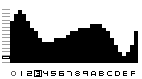
In this sound example the wavetable is set to a classic row of harmonics. The playing loop consists of two FM sounds and a plain tone with pitch envelope. The wavetable fades downwards through the spectrum which sounds similar to a narrow bandpass filter with high resonance. It affects the modulated sounds much stronger than the plain one:
wave.mp3 (279 kb)
swing factor
This little feature is especially nice on lower speed. It can be activated for each loop and instrument separately.
The mp3 example loop (185 kb) is mainly made from noise and clicks.
data storage
To save loops permanently there is an extra file menu with 60 pattern-slots for each instrument, split in four banks:
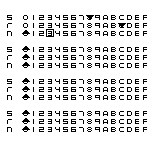
With one button press, loops can be loaded and saved. File access is quick enough to use it for live mixing: Once a bank is filled, you can play around with endless possibilities of pattern-recombination by loading different loops for the instuments.For more complex structures you can load up to four patterns simultaneously which then play alternating and can be edited in the same time.
song editor
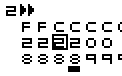
Each bank also holds a song structure of 256 patterns length (makes eight minutes at 128 bpm) which can be arranged from the bank's patterns with a simple 3-track editor.
speed / sync / MIDI
Speed is displayed / adjusted as BPM value and can be increased up to self-oscillation. Playback is always constant, even during load- and save-procedure or wave form calculations, there is no delay in sound.

Via GameLink cable, two nanoloops can be synchronized. Other devices can connect with nanoloop through a MIDI-sync adaptor and sync nanoloop as slave. The new version of this adaptor can tell sync-, start- and stop-signals from others and can be used in any MIDI-setup.
Further information about the cable can be found here.
hardware requirements
Generally, nanoloop runs on all GB types. Allthough there are no color features, it also compiles with GB color. Anyway, there are certain diferences in sound quality. GB color and GB light produce various kinds of pitched noise. GB pocket is more quiet but for its higher base voltage, GB classic has more power and is said to have more "warm" and balanced sound characteristics. So the good old grey one is the recommended platform.
Game Boy Advance:
Nanoloop runs fine on GB advance, sound quality is similar to GB pocket. In the forum there are some reports and sound examples from users for direct comparsion.
For more detailed information about the editor, please have a look at the html-version of the printed manual.
|
|
|
|
|
Copyright for Nanoloop, screenshots, audio and html
| (c) oliver wittchow |
| Nintendo, Game Boy, Game Boy Pocket
and Game Boy Color are registered trademarks of Nintendo of America,
Inc. Nintendo of America, Inc. has not recommended, authorized, endorsed, approved of, or licensed Nanoloop or this site. |
